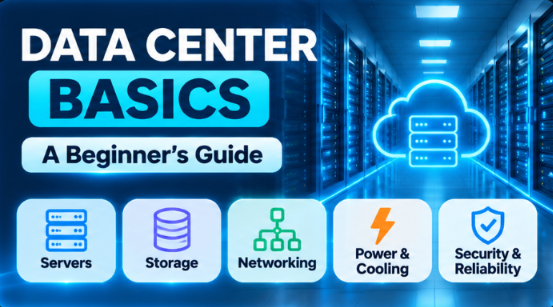
Data Center Basics: A Beginner's Guide
What is a data center?
A data center is a big, secure building full of computers. These computers run all day and all night, so your apps and websites never go to sleep.
Think about your last hour online. Maybe you watched a video, paid with UPI, or checked your mail. Every one of those actions reached a data center somewhere. Supermicro's guide describes it as a facility built to hold a company's key computing equipment: servers, storage, and networking.
I wrote this guide for complete beginners. You do not need any tech background. Let's go step by step.
Why should you care?
Because almost everything you do online lives in one. Your photos, emails, bank apps, online shopping, and AI tools are all stored and run on computers inside data centers.
Here is what a good data center gives you:
• It never sleeps. A website should open at 3 AM just like it does at 3 PM.
• It is fast. Many sit close to big internet connections, so pages load quickly.
• It is safe. Your data is guarded from theft, fire, and power cuts.
• It is shared. Many companies rent space in the same building, so each one does not need to build its own.
What is inside?
Open the door and you will find three main things. Together, they store your data, run your programs, and move information around.
Part | What it does | Easy example |
Servers | Powerful computers that run apps and websites | The computer that loads your Instagram feed |
Storage | Disks that keep data safe for a long time | Where your photos are saved |
Networking | Routers, switches, and cables that connect everything | The roads between computers and the internet |
Servers sit in tall metal frames called racks, and racks stand in long rows. Storage is not only fast SSDs. Sites also use cheaper hard disks and even tape for long-term archives. Servers do not live forever either. Supermicro notes that they are usually replaced every 3 to 5 years.
Power and cooling
Computers eat a lot of electricity, and they get hot. So a data center has two big jobs: keep the power on, and keep the machines cool.
• Power: electricity comes from the utility. If it cuts out, a UPS (a big battery) takes over at once, and backup generators support it for longer outages. Power distribution units (PDUs) share the electricity across the racks.
• Cooling: special air conditioners (called CRAC units) keep the rooms cold. Newer sites also use liquid cooling to handle very hot, dense equipment.
• Fire safety: many sites use gas or fine water mist systems, which are made to stop a fire without ruining the servers.
Security and reliability
A data center has to protect two things: the building and the data inside it.
• Building security: biometric access (like fingerprint scanners), cameras, and reinforced walls.
• Digital security: firewalls, encryption, and systems that spot intruders.
• Spare parts: important equipment comes with a backup, so one failure does not stop everything. This idea is called redundancy.
• Tiers: the Uptime Institute rates facilities from Tier I to Tier IV. A Tier III site can have any part serviced without shutting down. A Tier IV site goes further and keeps running even when a piece of equipment fails. The Institute also says a higher tier is not automatically "better". The tiers simply suit different kinds of businesses.
One number to remember: 99.99% uptime sounds perfect, but it still allows about 53 minutes of downtime in a year.
Not all data centers are the same
They come in a few flavors, depending on who owns them and what they are used for. Supermicro's overview lists these common types.
Type | Who owns it | Best for |
On-premises | One company, inside its own building | Banks, government, and firms that need full control |
Colocation | A provider; many companies rent space for their own servers | Companies that want their own hardware without building a data center |
Cloud | Big providers like AWS and Oracle Cloud | Startups and anyone who wants to pay only for what they use |
Edge | Small sites near users | Fast response, like gaming and smart devices |
Hyperscale | Giants like Google and Amazon | Huge cloud and big data work |
Data centers and the cloud
Here is a little secret: the cloud is not magic. It is simply someone else's data center that you use over the internet. When you launch a server on AWS or Oracle Cloud, a real machine in a real building runs it for you.
Cloud companies build many data centers and group them, so one problem does not take everything down:
• AWS: a Region is a place where AWS clusters its data centers. Each Region has at least three separate Availability Zones, and every zone has its own power, cooling, and physical security. At the time of writing, the AWS page counts 124 zones in 39 Regions.
• Oracle Cloud (OCI): a region holds one or more availability domains, which are data centers that do not share power or cooling. Some regions, like Mumbai, have just one availability domain. OCI then uses fault domains inside it to spread your servers across different hardware. See the Oracle docs.
If you run your app in more than one zone or domain, a single building failing will not take you offline.
How to start learning
You do not need your own data center to learn about one. Try this path:
- Learn Linux basics, because most servers run Linux.
- Understand networking: IP address, DNS, and how data travels.
- Open a free cloud account (AWS or OCI) and launch a small server.
- Learn about storage, backups, and monitoring.
- Read about power, cooling, and uptime tiers to see the full picture. A data center may look like a quiet room full of blinking lights, but it is the heart of the digital world. Once you understand it, cloud and DevOps topics feel much easier. Happy learning!
References
I checked these pages on 3 November 2026.
• Uptime Institute: Data Center Tier Classification System
• Amazon Web Services: Regions and Availability Zones
• Oracle Cloud Infrastructure: Regions and Availability Domains